

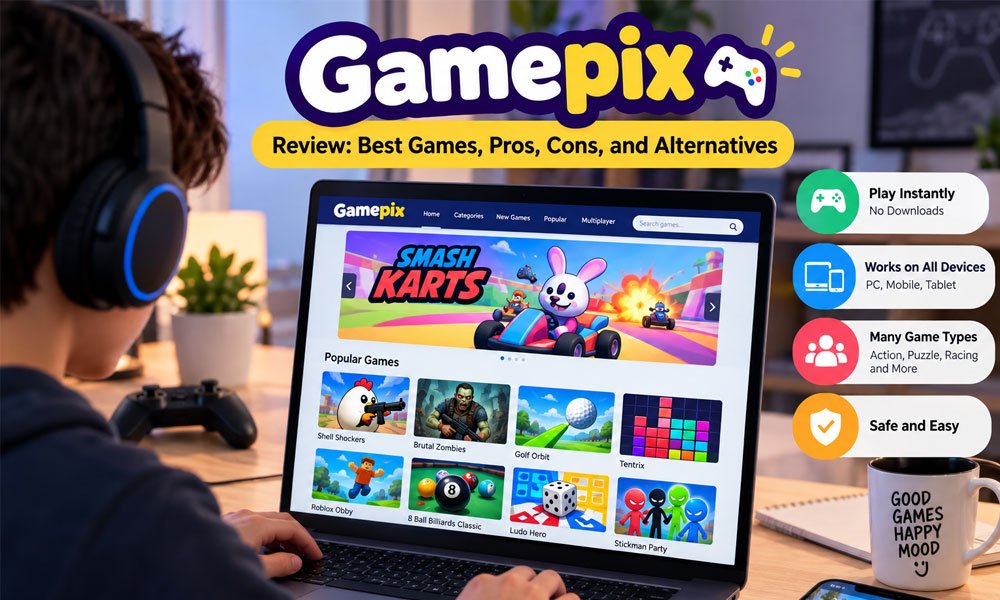
Have you ever wanted to play a quick game without downloading a big app? Gamepix makes this very easy. You can open your browser, choose a game, and start playing. There is no long setup before the fun begins.
Gamepix has many browser games for different types of players. You can find racing, action, puzzle, sports, and multiplayer games. Many games work on computers and mobile devices. However, device support can be different for each game.
In this Gamepix review, we will look at how the platform works in 2026. We will explore its main features, popular games, game types, safety, costs, pros, cons, developer tools, and some good Gamepix alternatives.
What Is Gamepix?
Gamepix is an online gaming platform with a large collection of browser games. Many of its games use HTML5 technology. This allows them to work inside a modern web browser without a normal game download or long installation process.
Using Gamepix is quite simple. You visit the platform, find a game that looks fun, and open it. This makes Gamepix useful when you only have a short break and do not want to spend time installing a large game.
The platform has games for many interests. Some players may want a fast racing game. Others may enjoy puzzles or sports. There are also action and multiplayer choices. This wide mix makes Gamepix useful for different types of casual players.
How Does Gamepix Work?
Gamepix works through your web browser. You can visit the website and browse its game library. When you find something interesting, you can open the game page and start playing. Most games do not need a normal software installation.
HTML5 technology plays an important role here. It helps modern games run inside browsers such as Chrome, Safari, and other common choices. You do not need the old Adobe Flash Player to enjoy modern HTML5 games on the platform.
The experience can change from one game to another. Some titles are made for both computers and mobile devices. Others may work better on a desktop. It is always helpful to check the game page if you are unsure about device support.
Best Features of Gamepix
One of the best things about Gamepix is quick access. You do not need to spend a long time setting things up. Pick a game and start playing. This can be great when you only have a few free minutes.
Another useful feature is the large choice of games. Gamepix covers many popular types. You can move from a puzzle game to a racing game or an action title without leaving the platform. This keeps the experience fresh and interesting.
Gamepix also has tools for game makers. Developers can publish HTML5 games and reach more players. The platform supports game distribution and ways to earn money from eligible games. We will explore the developer side later in this Gamepix review.
Best Gamepix Games to Play
Brutal Zombies is a good choice for players who enjoy action. You face groups of zombies and need to keep moving while fighting them. The game can become challenging quickly, which makes each round feel more exciting.
Shell Shockers offers a very different style of action. It is an online shooting game where players control armed eggs. The funny idea makes it stand out, while its fast matches can keep multiplayer fans busy for quite some time.
There are other fun choices too. Smash Karts mixes racing with battles. Golf Orbit offers simple sports fun. Puzzle fans can try TenTrix, while games such as Four Colors Multiplayer and Ludo Hero can be good choices for casual play.
Gamepix Game Categories
Not everyone enjoys the same type of game. This is why having different categories matters. Gamepix includes action and shooting games for players who enjoy fast movement, battles, challenges, and quick decisions during each gaming session.
Racing and sports fans also have plenty to explore. You may race vehicles, play simple sports games, or try to beat your own best result. Puzzle and strategy games offer a slower experience where thinking and planning matter more.
Gamepix also includes arcade, casual, and multiplayer games. Multiplayer titles can be fun when you want to compete with other people. Casual games are better when you simply want something easy to enjoy during a short break.
Can You Play Gamepix on Mobile?
Yes, many Gamepix games can be played on mobile devices. You can open a supported game through a modern browser on an Android phone or iPhone. Tablets can also run many titles without requiring a normal game installation.
This makes Gamepix useful when you are away from your computer. You could play a short puzzle while waiting somewhere or enjoy a quick racing game during free time. A browser and a stable internet connection are usually the main things needed.
However, not every Gamepix game supports every device. Some games are designed mainly for desktop browsers. Controls can also feel different on a touchscreen. Checking the device details before playing can help you choose a game that works well.
Is Gamepix Safe to Use?
Gamepix has one useful safety advantage. Its browser games normally do not require you to download unknown game files. This can reduce some of the risks that come with downloading games from random or unofficial websites on the internet.
Gamepix says games are checked before they are published. Its main platform is designed for people aged 13 and older. It also provides a separate kids area for younger players, with extra limits around features such as advertising and tracking.
Still, normal online safety rules matter. Gamepix uses ads on its main service, so players should be careful with unrelated ads or outside links. Keeping your browser updated and using the official Gamepix website can also help create a safer experience.
Is Gamepix Free?
Yes, Gamepix lets you play many games for free. You can open the website, choose a game, and start playing. For many titles, there is no need to buy the game before you can enjoy it.
So, how does Gamepix keep its games free? The main platform uses ads to support its service. You may see ads before or during some games. They can sometimes break the flow, but they help keep many games free.
Some games may also offer optional items or purchases. You do not always need these extras to play. If a child uses the main site, parents should still check the game and any payment options before letting them make a purchase.
Gamepix Pros and Cons
Gamepix has some clear benefits. It is easy to use, and many games start inside your browser. You can explore action, racing, sports, puzzle, and multiplayer games without filling your device with many large game apps.
Another good point is choice. You can play a puzzle for a few minutes, then move to a racing game. Many games also work across different devices. This makes Gamepix useful for people who enjoy quick and casual gaming.
There are some downsides too. Ads can appear during your visit. You normally need an internet connection, and game quality can vary. Some titles may also work better on a computer than on a phone or tablet.
| Pros | Cons |
|---|---|
| Many free games | Ads may appear |
| Easy to start | Internet is usually needed |
| No normal installation | Quality can vary |
| Many game types | Some games are desktop-only |
| Mobile-friendly choices | Controls vary by game |
| Multiplayer options | Some games may offer purchases |
Gamepix for Game Developers
Gamepix is not only made for players. Game makers can also use the platform to publish HTML5 games. This can help a small developer reach people without having to build and grow a large gaming website alone.
Developers can submit games and use Gamepix tools to prepare them for the platform. Gamepix also works with popular game tools and engines. These include GDevelop, Unity, Godot, Construct, and other options used to build web games.
Game makers can also check how their games are doing. This may include useful game and earning data. For a developer, these tools can make it easier to see which games attract players and which titles need more work.
How Gamepix Developers Can Earn Money
Making a fun game takes time. Gamepix gives eligible developers a way to earn money when their games are played. Advertising is an important part of this system, which is also one reason players can access many games for free.
Gamepix currently promotes a revenue share for developers. This means part of the money made from eligible games can go to the developer. The exact income can change based on the game, its players, and its overall performance.
This makes Gamepix useful for both new and experienced game makers. A developer can publish a browser game, reach more players, and track its results. Still, there is no promise that every game will make a large amount of money.
Best Gamepix Alternatives
Gamepix has plenty to explore, but you may sometimes want something different. Poki is one popular choice. It offers many simple browser games across action, puzzle, sports, racing, and other categories for casual players.
CrazyGames is another well-known option. It has a large collection of browser games, including multiplayer and 3D titles. Yandex Games also offers many choices. These platforms can be useful when you cannot find the game you want on Gamepix.
Other options include Kevin Games and Friv. Kevin Games has many casual browser titles, while Friv is known for simple games that are easy to start. Trying a few platforms can help you find the game library you enjoy most.
| Platform | Good For |
|---|---|
| Gamepix | Large mix of HTML5 games |
| Poki | Simple casual games |
| CrazyGames | Multiplayer and 3D games |
| Yandex Games | Large game selection |
| Kevin Games | Quick browser gaming |
| Friv | Simple and family-friendly games |
Gamepix vs Other Browser Gaming Sites
Gamepix shares many features with other free gaming sites. Gamepix, Poki, and CrazyGames all make it easy to start browser games without a normal installation. Each platform, however, has its own game library and website style.
One player may prefer Gamepix for its mix of games. Another may enjoy the design of Poki. Someone interested in multiplayer titles may also explore CrazyGames. There is no need to stay with only one gaming website.
The best choice depends on what you want to play. Check the game selection, device support, ads, and controls. You should also use trusted official websites, especially when playing online games or allowing younger family members to use them.
Bottom-Line
Gamepix is worth exploring if you enjoy quick browser games. Its biggest strength is simple access. You can choose from many games without going through the normal process of downloading and installing a large game on your device.
It is especially useful for casual players. Maybe you have 15 minutes before work or want a simple puzzle after a long day. Gamepix gives you many choices without asking you to spend much time getting started.
There are some limits. Ads may become annoying, and not every game has the same quality or device support. Still, this Gamepix review shows that the platform can be a useful choice for free browser gaming in 2026.
(FAQs)
Is Gamepix completely free?
Many Gamepix games can be played for free. The main platform uses advertising to help support its free service. Some individual games may also include optional purchases, so it is worth checking before spending money inside a game.
Is Gamepix safe for kids?
The main Gamepix website is designed for people aged 13 and older. Gamepix also provides a separate kids area for younger users. Parents should still check games and teach children basic online safety before letting them play alone.
Does Gamepix require a login?
You can access many Gamepix games without going through a long account setup. This makes it easy to start playing quickly. However, certain platform or game features may work differently, so check the page when using a specific title.
Can Gamepix games be played on phones?
Yes, many Gamepix games work on smartphones and tablets through modern browsers. However, support depends on the game. Some titles may be made mainly for desktop computers, while others offer controls designed for mobile touchscreens.
Does Gamepix have multiplayer games?
Yes, Gamepix has multiplayer choices. Games such as Shell Shockers and Smash Karts offer online competition. Multiplayer games can be a fun option when you want more action than you may get from a simple single-player title.
Does Gamepix need Flash Player?
No, modern Gamepix games use web technology such as HTML5. This means you do not need Adobe Flash Player. You can open supported games through a modern browser and start playing without installing the old Flash software.
What are the best games on Gamepix?
Popular choices can include Shell Shockers, Smash Karts, Brutal Zombies, Golf Orbit, TenTrix, and Four Colors Multiplayer. The best choice depends on what you enjoy, so trying games from several categories is a good idea.
Can developers publish games on Gamepix?
Yes, Gamepix provides publishing tools for HTML5 game developers. Developers can submit suitable games and reach players through the platform. Gamepix also supports several popular tools and engines used by people who create browser games.
How do Gamepix developers earn money?
Eligible developers can earn through Gamepix’s ad and revenue-sharing system. Earnings can depend on how a game performs and how many people play it. Developers can also use platform data to follow the performance of their games.
What are the best Gamepix alternatives?
Popular Gamepix alternatives include Poki, CrazyGames, Yandex Games, Kevin Games, and Friv. Each site has a different game library. Trying more than one can help you find browser games that better match your interests.
More to Explore: How to Screenshot on an HP Laptop: Easy Tips for Beginners
